|
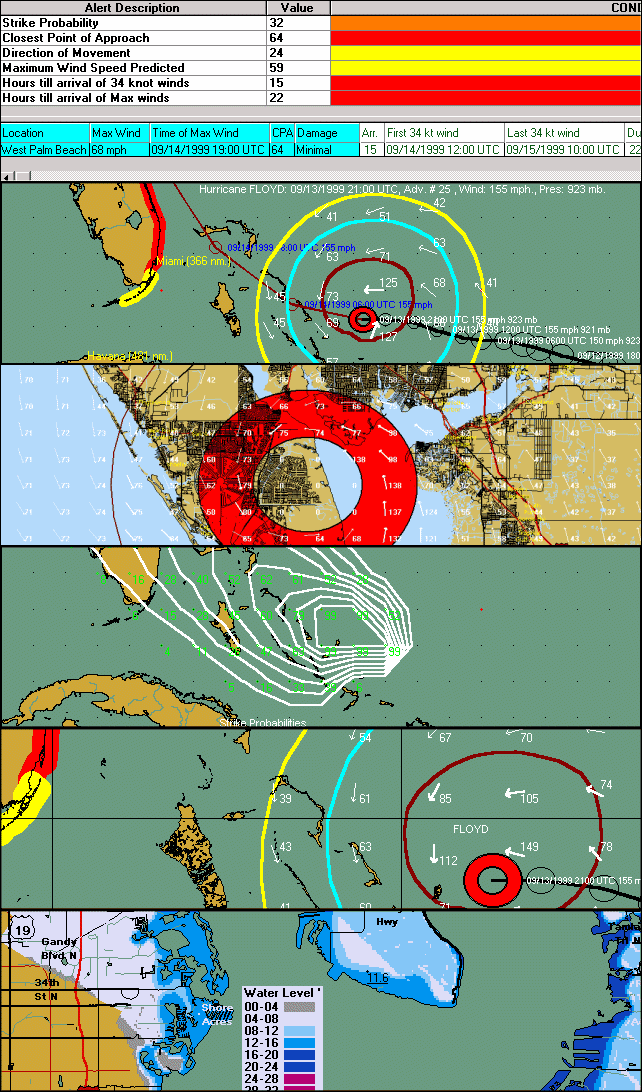
Advanced Wind Estimation (AWE)
More accurate wind speed / damage
estimates by taking into account surface friction. Reduces errors from
50% to 15%. |
 |
SLOSH Storm Surge Inundation Analysis
|
 |
"Expert Ease"
–
On a daily basis, our chief meteorologist
will discuss, via video update, current tropical
conditions as
well as what is likely to occur in the near term. His observations are
integrated within the Hurrtrak program throughout the Atlantic Hurricane
season. |
 |
"Enhanced Hurricane Watches and Warnings"
–
The National Weather Service
/ Hurricane Center is improving the depiction of
wind watches and warnings...
and adding in 2018,
accurate Storm
Surge watches and warnings. |
 |
"Potential Tropical Cyclones"
–
This year the National
Weather Service (NWS) will have the option to issue advisories and watches &
warnings for disturbances that are not yet tropical cyclones, but which pose
the threat of bringing tropical storm or hurricane conditions to land areas
within 48 hours. |
 |
"Enhanced Storm Surge Probabilities"
– Severe Weather Watch & Warning Alerting allows the user to quickly
receive notifications when severe weather threatens any set of locations.
Alerts are delivered via email or shown on the "desktop". |
 |
"Observed Storm Report"
– A new
report that list the local storm reports for a specified time period and
area. As with all Hurrtrak reports... this report can easily be shared
with others via email. |
 |
"Warnings Report"
– A new
report that list the active tornado and thunderstorm warnings for a
specified area. As with all Hurrtrak reports... this report can easily
be shared with others via email. |
 |
"Severe Weather Alerting System"
– Severe Weather Watch & Warning Alerting allows the user to quickly
receive notifications when severe weather threatens any set of locations.
Alerts are delivered via email or shown on the "desktop". |
 |
"Storm Report Notification and
Alerting"
– This feature alerts users when a storm is reported (on the ground).
Alerts can be configured for any location or set of locations and delivered
on the "desktop" or via email. |
 |
"Observed Weather Notifications"
– Similar to the 2 items above, this feature will send out alerts
when any official weather station observes a severe weather conditions.
i.e. heavy thunderstorm, hail, damaging wind reports. Again... alerts
are sent out via Email or shown on the desktop. |
 |
"Point and Click GFS forecast
and report"
– Within the observation module you can now show forecast generated
by the US Model (GFS) in both textual and digital form. In addition, a
summary report can be generated for a set of locations giving the user a
quick view of forecasted conditions for sites they monitor. |
 |
"Forecast Wind
Trend"
– Forecast wind trend indicates the change in a
location’s forecast wind
from the prior forecast
advisory and is extremely
helpful in quantifying the
effect of a newly released
forecast from the National
Hurricane Center (or JTWC).
This information will be
included on all location
impact type reports as well
as the risk analysis
function and the narrative
impact statement. |
 |
"Higher elevation wind
estimation"
– In addition to estimating winds near ground level the system also
allows you to estimate winds at different elevation levels. For example, you
can estimate winds on top of a high rise building or on top of a rig, power
lines, etc.. This is especially useful if you need to consider assets at
elevations other than 33 feet (the default for the system).
 |
 |
"Desktop Rebuild"
– The Hurrtrak system will “remember” the graphics, reports and
animations created/viewed for a storm, and recreate them automatically when
reloading or when storm data is updated. Items automatically rebuilt
include ALL of the tracking charts and the options displayed on them. |
 |
"Current Weather/Depiction"
– Examine current observations for all official weather stations,
NOAA operated coastal stations, Buoys, Oil Rigs, Ship Reports and observed
storm reports (over 5000 stations). Data includes Wind Speeds, Wave Heights,
Pressure, Ocean Temperatures, Air Temperature, Dew Points and Local Storm
Reports.
|
 |
"Watches/Warnings"
– The system is now able to determine whether individual locations
are included within NHC/NWS issued hurricane and tropical storm watches and
warnings. This is displayed graphically and also included on all location
based reports. These include the EZ-report, Location Wind Profile, County
Wind Profile, Zip Code Wind Profile, Executive and Risk-Impact reports. .
|
 |
EZ Map –
Enables
both new and seasoned users to be more productive immediately. Press a
button, and the system generates a tracking map for a current storm with all
of the most common plot options. Choose from a default to user specific options.
|
 |
EZ Report –
Designed
for new users, but useful for everyone. Simply supply a valid US address
(street address, city-state, zip code) and the system generates an
informative report for that single location. Just click on the "EZ"
button, supply an address and you have your report...
Boom!
|
 |
Data
Layering -
The ability to easily view/hide different data layers. |
 |
More Maps! -
We have added a few more topo/relief type maps to the system.
|
 |
Simplified Google
Earth Selection and Output -
With just one click , you can create a collection
of Google Earth output and bundle them into one file.... and, you can either
save it as a file, save it to the EMail Outbox for later EMailing.
EMail it immediately or initiate a Google Earth session. In addition,
Google Earth files can now be automatically generated an Emailed when new
data arrives on a current storm. |
 |
Redesigned EMail
Alerts - In 2011 we have simplified the creation and execution of EMail
Alerts. We have
also added a new EMail Alert type called a Location Group Alert.
|
 |
Revamped Automatic
Summary Reports - We have also simplified the definition and execution
of Automatic Summary Reports. In addition, we have added a new
Automatic report... Risk/Impact report..
|
 |
New Automation -
In 2011 we have
added a whole new category of Automation outputs.. they include,
Tracking Maps, Google Earth KML/KMZ, EXCEL and Shape File output.
These output files can either be saved as a file and/or emailed.
|
 |
Enhanced Usability -
A recent "facelift" provides greater use of command and toolbars as well as
ease in selection of maps and satellite images. |
 |
Multiple EMail
Attachments - For
anyone who emails information from the Hurrtrak system.. and who doesn't...
this is a welcome time saving addition which allows the user to send
multiple application outputs in a single email. |
 |
Interactive Wind
Speed Forecast - Just
“point & click” on a tracking map and display forecast wind speeds for
desired location. |
 |
Risk/Impact Tab-
New tab displays the Risk/Impact information,
along with a wind speed/ direction graph for all your base locations.
|
 |
Risk/Impact Reporting -
New report displays the Risk/Impact
information, along with a wind speed/ direction graph for
any set of locations.
|
 |
Application "Skins" -
Personalize your system's
look and feel by using different application color and font schemes or
"skins" with the Hurrtrak Application. |
 |
SLOSH Inundation location reports. This allows the
user to analyze specific locations to
determine the storm surge flooding potential.
|
 |
AWE Wind Pattern graphic which shows the
Advanced wind pattern field around the storm.
|
 |
Animated
Wind Pattern graphic. Same idea as above but now it can be
animated. |
 |
Zip Code Wind Thematic. Similar to the county
wind thematic except at a much more detailed level of zip code..
|
 |
"Executive" Style Impact Summary Reports.
|
 |
Point and Click Reports.
|
 |
Tray Alert Messaging -
We found that Hurrtrak users busy at
their workstations desired a way to be alerted to new and changing
conditions in the tropics. No problem! In 2009 we are introducing a "tray
alert messaging" (TAM) system. TAM notifies our users, via pop-up tray
messages, of several noteworthy conditions including: the formation of new
storms, storm strengthening or weakening, the issuance of watches or
warnings, updated storm data, issuance of the last advisory, new tropical
weather outlooks or new tropical disturbance statements. |
 |
Storm Surge Probabilities -
The
Hurrtrak system has the ability to display…both graphically and through
reports, storm surge probabilities for 2' - 25’. This combined with enhanced
SLOSH information, provides users with the most detailed storm surge
information available. |
 |
Narrative Impact Statements -
In addition to the summary and detailed
impact reports, in 2009 we have added the ability to show a "computer AI
generated" narrative description of the impact to a location. This can be
viewed for the base location, any location in a summary impact report and/or
in the auto generated summary report. Both standard and "executive" formats
are available. |
 |
"True" Pan and Zoom mapping in
SloshView -
Pan & Zoom capabilities to the Slosh display program. This allows the
user to select a different map region to analyze without having to "reset"
the map and redefine the storm surge parameters. |
 |
Location plot font control -
In the
2009 version, users have the option to select the font type, color,
and size used to plot a location on a tracking chart. The color can
be controlled by location groups or individual location... thus enabling the
user to "highlight" critical locations on a map. |
 |
Tropical Disturbance Statements -
Tropical
disturbance statements will now be part of the Hurrtrak Online data stream
and displayed in the Hurrtrak system.
|
 |
Multiple "undo" levels -
Enhancements to the user
interface now include the ability to undo multiple plotting layers.
|
 |
Average
Forecast Error Enhancements -
We have added the ability to plot the 72 and/or 120 hour forecast average
error. |
 |
Forecast Model Selection Enhancements -
Users can
now be more selective of which forecast models to plot. (Selection is by
type and time period.)
|
 |
Enhanced Risk Alert -
Both wind
probability and wind probability trend have been added to the risk
alert table. |
 |
Executive Summary Report Enhancements -
The executive summary report is
now more flexible than ever before and includes optional narrative impact
statements, wind probabilities and storm surge probabilities (for coastal
locations). |
 |
Native Google Earth support. In
addition to the graphics interface above, this function export KML (Google
Earth's native language) that represents a significant number of a storm's
observed and forecast parameters.
|
 |
Expanded Google Earth Information.
In addition to the LARGE
amount of hurricane information that the user is able to export from the
HURRTRAK system, you can also
superimpose National Weather Service information on the same
Google Earth “image”. |
 |
Damage Comments.
The summary impact report which details
expected wind speeds for locations has a damage comment column which
describes the likely damage using either the Saffir-Simpson scale or a
modified Texas Tech University scale.
|
 |
Integration with
Google Earth. This function provides
the ability to export just about all of the system graphics and display them
on Google Earth. |
 |
Support of
National Hurricane Center Wind
Probabilities |
 |
Utilize a 30 meter Slosh
Elevation database. This allows for detailed SLOSH Inundation
Analysis |
 |
Multi-colored wind arrows showing the storm's
wind vectors. |
 |
Additional
Extensive reporting capabilities |
 |
Overlay past storm tracks on
the same chart as a current storm. |
 |
Utilize an extensive historical
analysis system which includes data from 1851 to 2023. It allows the user to search
for storms by Name, Year, Intensity and Location (i.e. all storms in the past 75 years
that passed within 27 miles of Miami, FL in the month of September). It will then allow
the user to depict the selected storm tracks as well as display highly detailed storm
data. |